Understanding the HR Admin Role
The role of HR Admin is one of the more robust permission sets in Eddy. HR Admins can do a variety of things, ranging from document management to time tracking.
HR Admin Role Overview
Understanding the HR Admin Role
The HR Admin role is comprehensive of nearly every function in the product outside of Hiring. Those with HR Admin permissions are able to view the following tabs within Eddy:
- The Home tab
- The People tab
- The Tasks (Onboarding) tab
- The Time Tracking tab
- The Time Off tab
- The Pay Periods tab
- The Documents tab
- The Trainings tab
- The Reports tab
The HR admin does not have access to the Hiring Tab, a few reports, and some of the tabs within the Admin Tab. This includes the following:
- Permissions
- Company Info
- Eddy Subscription Information
- Employee Info Report (Due to the sensitive pay and SSN information)
- Pay Period Report (Due to the sensitive pay information)
Permissions with the Accessible Tabs
Within the tabs an HR Admin can access, they are able to do nearly every function. For example, they can:
- View, add, edit, or delete information on any employee profile
- View the onboarding progress of new hires and assign them tasks
- View, add, edit, or delete time off policies, modify time off balances, and request time off on behalf of an employee
- View and edit employee timesheets
- Finalize pay period reports
- Add, edit, or delete documents.
- Make documents signable and request document signatures.
- Create, edit, or delete trainings. Acknowledge the completion of a training for any employee.
Available Permissions That Can Be Assigned to an HR Admin
Some permissions are available to HR Admins but are not given by default. Permissions for the following must be given by Owners and are not given to all HR Admins:
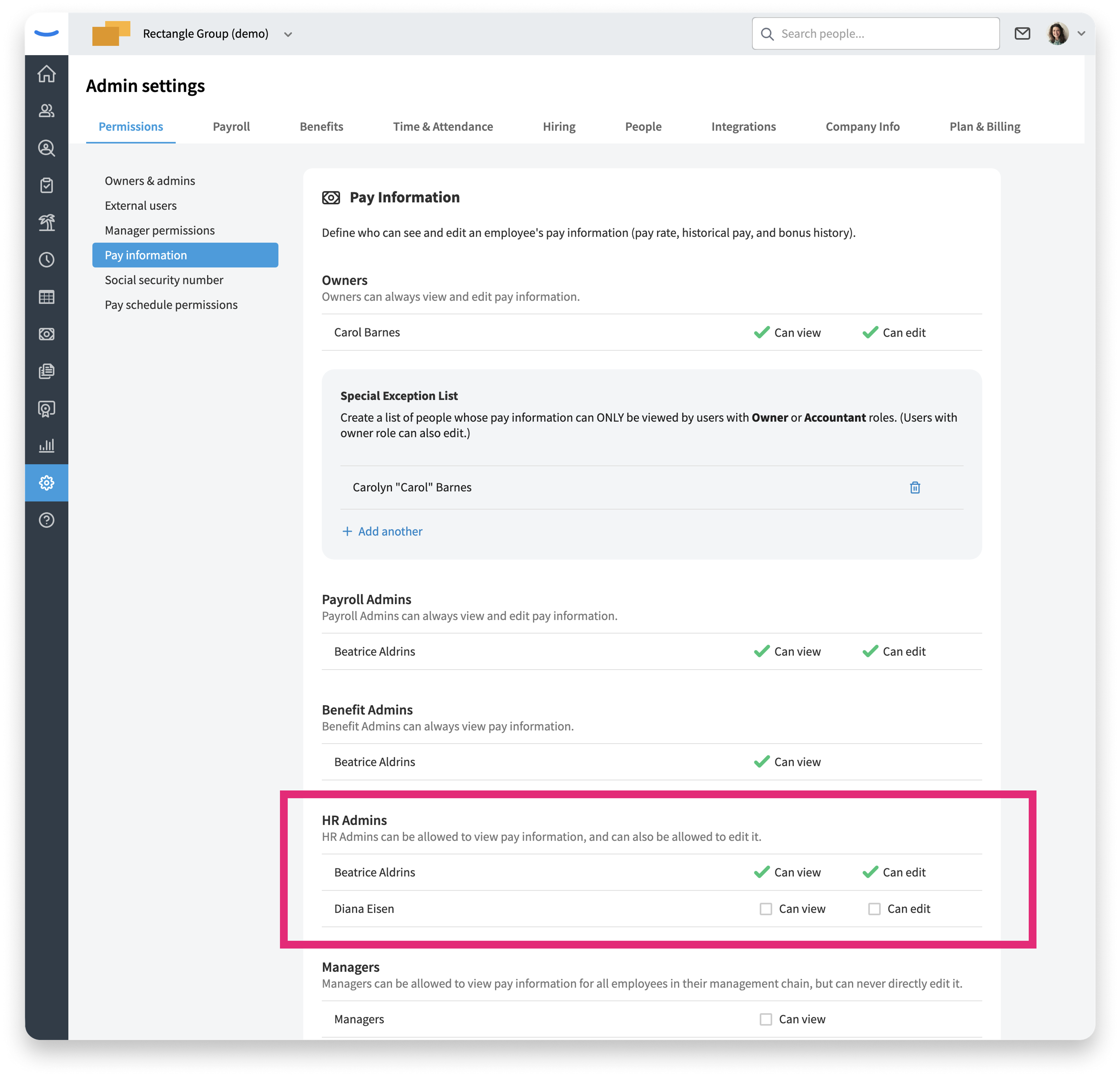
- Permission to view/edit employee pay
- Permission to view/edit employee social security numbers
Owners can give HR Admin users permission to view/edit these things by clicking on the Admin Settings tab and then clicking into the Pay Information and Social Security menu items listed beneath the Permissions sub-tab.
Limiting an HR Admin by Location or Department
An HR Admin can be restricted to one or more locations, one or more departments, or both. When both are set, they combine: the admin can only work with employees who fall within the selected locations and the selected departments.
A restricted HR Admin keeps full HR Admin abilities for the employees inside their scope, but loses access to several company-wide areas that a standard HR Admin can reach.
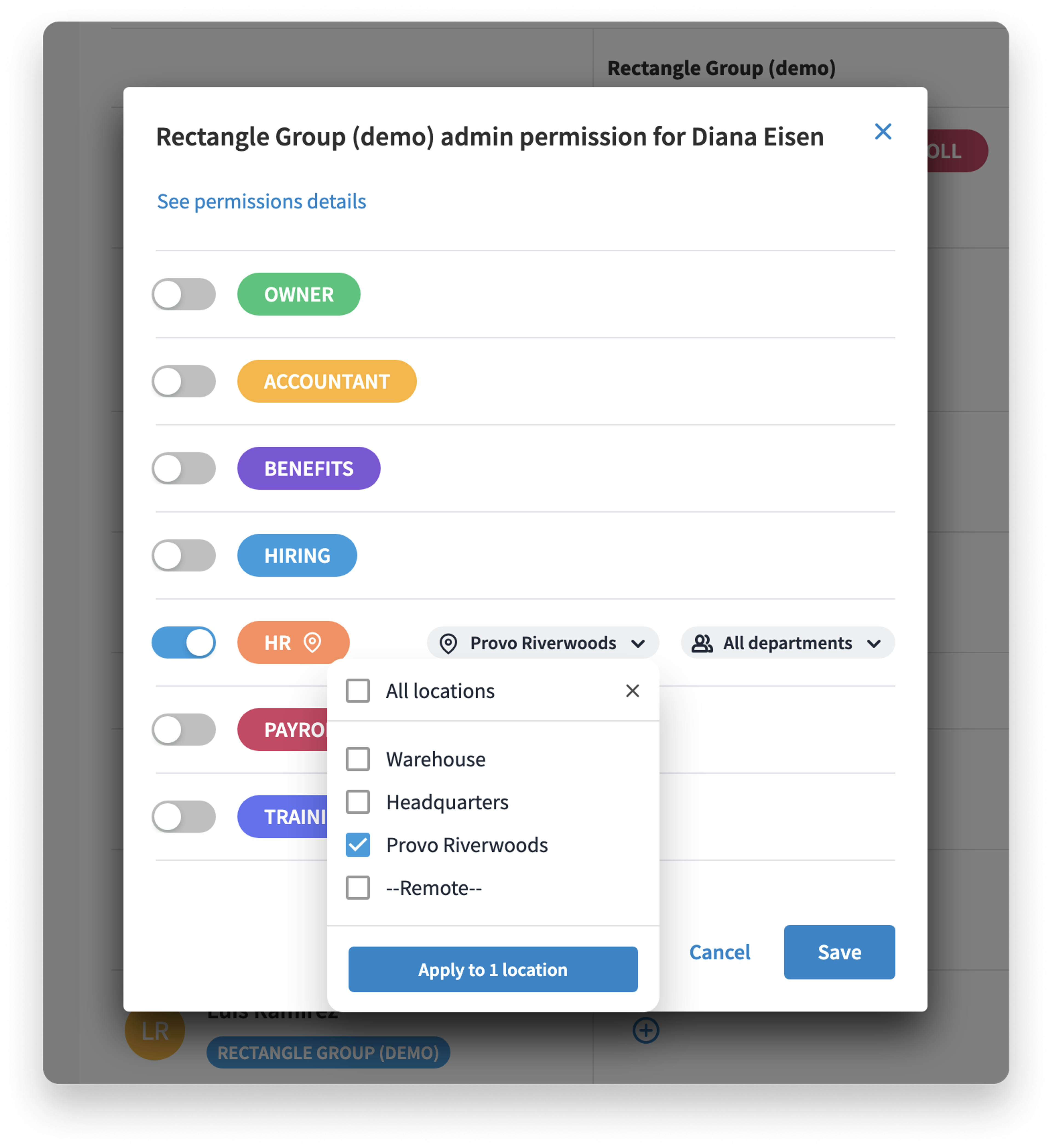
Within their assigned locations and departments, a restricted HR Admin can:
- View the full org chart, the same as any HR Admin
- View the People directory, but only open the profile (the View profile link) for employees within their scope
- Add employees, but only to their assigned location or department
- Add, view, and edit every tab on an in-scope employee's profile — Personal, Job, Pay, Documents, Onboarding, Training, Hours, Time Off, Performance, and the Admin Settings tab on the profile — including creating and assigning tasks such as review or signature tasks. The one exception is a worker's Location on the Job tab, which they cannot edit.
- Access the folders on an employee's Documents tab with the same access as any HR Admin
A restricted HR Admin can view the following areas, but only for people within their scope:
- Time Tracking
- Time Off
- Onboarding
A restricted HR Admin cannot:
- View Reports
- View the company-wide Trainings tab
- View the company-wide Documents tab
- View Onboarding templates
- Access most of the Admin Settings section in the main navigation at all — including pay schedules, workers' compensation, holidays, and other people settings.
The restricted admin CAN view time off policies, time tracking policies, and time clock tablet app settings for their workers.
Was this article helpful?